
The Grass Network offers a unique opportunity to earn rewards by sharing your unused internet bandwidth. For many participants, the ultimate goal is to qualify for an upcoming airdrop, and consistent node uptime is crucial for this.
Understanding how to track your daily node uptime metrics ensures you are actively contributing to the network and maximizing your potential earnings. This guide will walk you through the essential steps to monitor your Grass node's performance effectively.
Why is tracking Grass node uptime important for airdrops?
Tracking your Grass node uptime is important because it directly impacts your eligibility and potential allocation in future airdrops. Projects like Grass often reward consistent, active contributors over time.
For example, if an airdrop requires a minimum of 90% uptime over a 30-day period, regularly checking your metrics helps you stay above that threshold. A user with 95% uptime for June 2026 is likely to receive more points than someone with only 60% uptime, directly affecting their share of the distributed tokens.
The best way to check your Grass node connection status
The best way to check your Grass node connection status is through the official Grass Network dashboard. This platform provides real-time and historical data on your node's activity and connection quality.
Relying on the official dashboard ensures you are viewing the most accurate data directly from the network's internal tracking systems. This is far more reliable than guessing or using unofficial third-party tools that might not reflect the true status.
How do I access the Grass Network dashboard?
You can access the Grass Network dashboard by logging into your account on the official Grass website. Once you are logged in, the main dashboard will display your current statistics.
Simply open your web browser, navigate to the Grass Network login page, and enter your registered email and password. After successful login, you will be directed to your personal dashboard where all your node information is consolidated.
Where can I see my daily Grass uptime statistics?
Your daily Grass uptime statistics are typically found within the 'Dashboard' or 'My Devices' section of your Grass account. Look for metrics related to 'Uptime' or 'Connection History'.
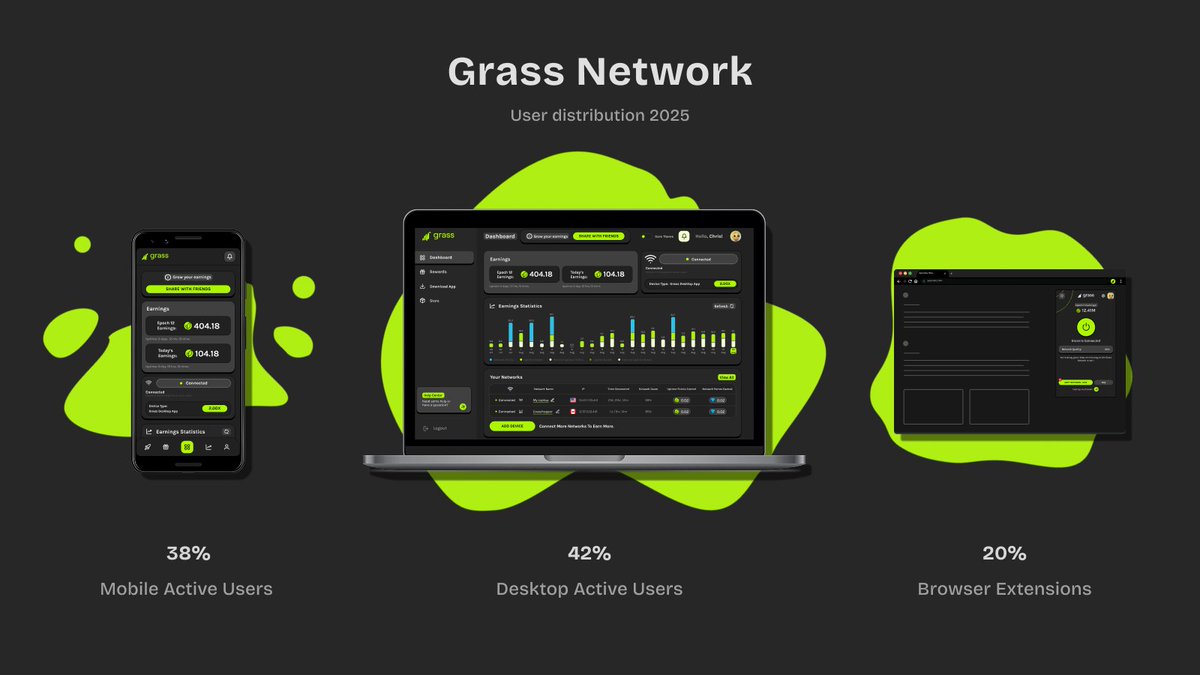
On the main dashboard, you'll often see a graph or a numerical display showing your uptime percentage over various periods, such as daily, weekly, or monthly. This section gives you a clear visual representation of how consistently your node has been running.
READ ALSO
How can I understand my Grass Network uptime percentage?
Your Grass Network uptime percentage represents the proportion of time your node was actively connected and contributing data to the network. A higher percentage means more consistent participation.
For instance, an 85% uptime over a 24-hour period means your node was active for approximately 20.4 hours. Aiming for 90% or higher is generally a good practice to ensure you're a valuable contributor and to maximize your potential airdrop rewards.
The factors that affect Grass node's uptime
Several factors can influence your Grass node's uptime, ranging from your internet connection to the device running the software. Understanding these can help you troubleshoot issues.
Here are some common reasons why your Grass node might experience downtime:
- Internet Connection Stability: Frequent disconnections or slow speeds can interrupt your node's activity.
- Device Performance: If your computer or device goes to sleep, shuts down, or experiences crashes, the node will stop running.
- Browser Issues: The Grass extension runs within your browser, so closing the browser or specific tabs can halt operations.
- Network Congestion: High traffic on your local network can sometimes interfere with the node's ability to connect consistently.
How can I improve my Grass node's uptime for better rewards?
Improving your Grass node's uptime involves ensuring a stable environment for the software to run continuously. Small adjustments can lead to significant improvements in your contribution.
Consider these practical steps to boost your node's uptime:
- Use a Dedicated Device: Run the Grass extension on a device that stays on 24/7, such as a spare computer or a low-power mini PC.
- Ensure Stable Internet: Use a wired Ethernet connection if possible, or ensure your Wi-Fi signal is strong and reliable.
- Disable Sleep Mode: Configure your operating system to prevent the device from entering sleep or hibernation mode.
- Keep Browser Open: Make sure the browser where the Grass extension is installed remains open and active. Consider using a separate browser profile just for Grass.
- Regularly Check Dashboard: Periodically log into your Grass dashboard to monitor performance and address any red flags immediately.
READ ALSO
Are there any third-party tools to monitor Grass node performance?
While some general network monitoring tools exist, it's highly recommended to rely solely on the official Grass Network dashboard for performance tracking. The official dashboard provides the most accurate metrics as seen by the network itself.
Using unofficial tools might give you a general idea of your internet's health, but they cannot precisely measure the specific uptime recognized by the Grass protocol. Always prioritize the data provided directly by Grass for airdrop-related metrics.
How does Grass Network track my data contribution?
The Grass Network tracks your data contribution by monitoring the amount of bandwidth you share and the duration of your node's active connection. This is converted into 'Grass Points' or similar metrics.
Every minute your node is online and actively contributing, you accumulate points. These points are the primary indicator of your value to the network and will likely be the basis for calculating your share in any future retroactive airdrops. Consistent uptime directly translates to more points earned.
Tracking your Grass Network node uptime is a straightforward yet critical task for anyone aiming to participate in its ecosystem and benefit from potential airdrops. By regularly checking your dashboard and optimizing your setup, you can ensure your contributions are consistently recognized.
Maintaining high uptime not only maximizes your chances for rewards but also strengthens the overall network. Make monitoring a regular habit to stay ahead and secure your spot in the Grass community.
Conclusion
Tracking your Grass Network node uptime is essential if you want to maintain eligibility for potential rewards and future airdrops. By regularly monitoring your node's status, internet connection, and earned points, you can quickly identify and fix issues before they affect your performance. Consistent uptime not only helps maximize your contribution to the network but also improves your chances of qualifying for any rewards tied to active participation. Stay informed through official Grass Network updates and make node monitoring part of your routine to get the most out of your involvement.